[AI PM in Practice] Say Goodbye to the Project-Doc Maze: Use a Claude Code Agent to Digest Your Predecessor’s Massive Handover Fast
![[AI PM in Practice] Say Goodbye to the Project-Doc Maze: Use a Claude Code Agent to Digest Your Predecessor’s Massive Handover Fast](/assets/images/Generated-Image-October-19--2025---5_19PM.png "[AI PM in Practice] Say Goodbye to the Project-Doc Maze: Use a Claude Code Agent to Digest Your Predecessor’s Massive Handover Fast")
Disclaimer: This post is machine-translated from the original Chinese article: https://ai-coding.wiselychen.com/ai-pm-shi-zhan-gao-bie-zhuan-an-wen-jian-mi-gong-yong-claude-code-agent-kuai-su-xiao-hua-qian-ren-liu-xia-de-hai-liang-zi-liao/
The original work is written in Chinese; the English version is translated by AI.
As a PM, have you ever faced this: you need to read everything your predecessor left behind—within a ridiculously short time? Besides accepting your fate and working overtime to grind through documents, is there a better way? Try an AI agent.
As a Claude Code fan, I’ve found that a Claude Code Agent isn’t only for Vibe Coding. It can genuinely save PMs and engineers a huge amount of reading time across many kinds of work.
A real case I ran into
These past two weeks, a senior PM at my company needed to change roles. Unfortunately, he owned our biggest overseas client—and he’s also a “documentation maniac.” In Google Drive alone there were 50+ projects worth of complete documentation and hundreds of files, spanning three to four years. Proposals, contracts, execution details, meeting notes, change requests, customer Q&A—everything.
Before AI, since I wasn’t the primary handover recipient (though I lead the PM team), I’d usually skim enough to get the gist and move on. But now that we have AI—think about it: Claude Code can understand large legacy codebases and extract key points. These project documents should be even easier, right?
The document environment
- Storage: everything is on Google Drive
- File formats: extremely inconsistent (Docx, Google Docs, PPTX, Excel, Google Sheets, PDF…etc.)
- Project types: operations/maintenance, development, CRs, cloud infra, even Machine Learning
For this agent work I chose Claude Code. I started with Sonnet 4.5, and later, because Claude Haiku 4.5 had just launched, I also ran several tasks with Haiku. For this kind of workload, it feels fast and works great.
Goals for this round
- Quickly understand the client’s full history. A concrete folder-level summary was the most important, plus deeper understanding of several ongoing projects
- Produce a timeline of how the client’s projects evolved
- Extract the technical “lines”/tech stacks across all projects
- Analyze the folder/file naming rules and organization; provide suggestions

Based on prior experience, for a handover of this scale, it would already be “lucky” if the new owner could achieve #1 within a few weeks. But with AI, #2–#4 suddenly felt possible.
In the end, #1–#4 took about one day. The big benefit of Claude Code is that you can let it run while you go to meetings—very little wasted time. After switching to Haiku it got even faster.
One more fun “easter egg”: during those takeover days, the customer asked (aka “pressured us”) to add a new data field. I immediately asked Claude Code to crawl through more than a year of project meeting-note PDFs/PPTs. It found that the meeting records never committed to that data field, so we successfully pushed back… XD
Scenario 1: Full-project summary
This is the easiest one. My approach was to use the GDrive MCP and ask Claude Code to:
- Step 1: use MCP to crawl the file list
- Step 2: read each file from that list and extract what it’s about
- Step 3: generate the final summary
Google Drive MCP worked, but Step 2 was much slower. Later I switched to downloading via the native Google Drive app to local disk, then writing Python to analyze files, which was dramatically faster.
Another reason to download locally: Claude Code often uses the Unix toolchain natively—find / head / tail / wc / grep—to do lots of basic operations, and it works really well. MCPs backed by APIs tend to be slower and can be finicky. After deciding to pull everything down first, the overall analysis speed was 100× faster.
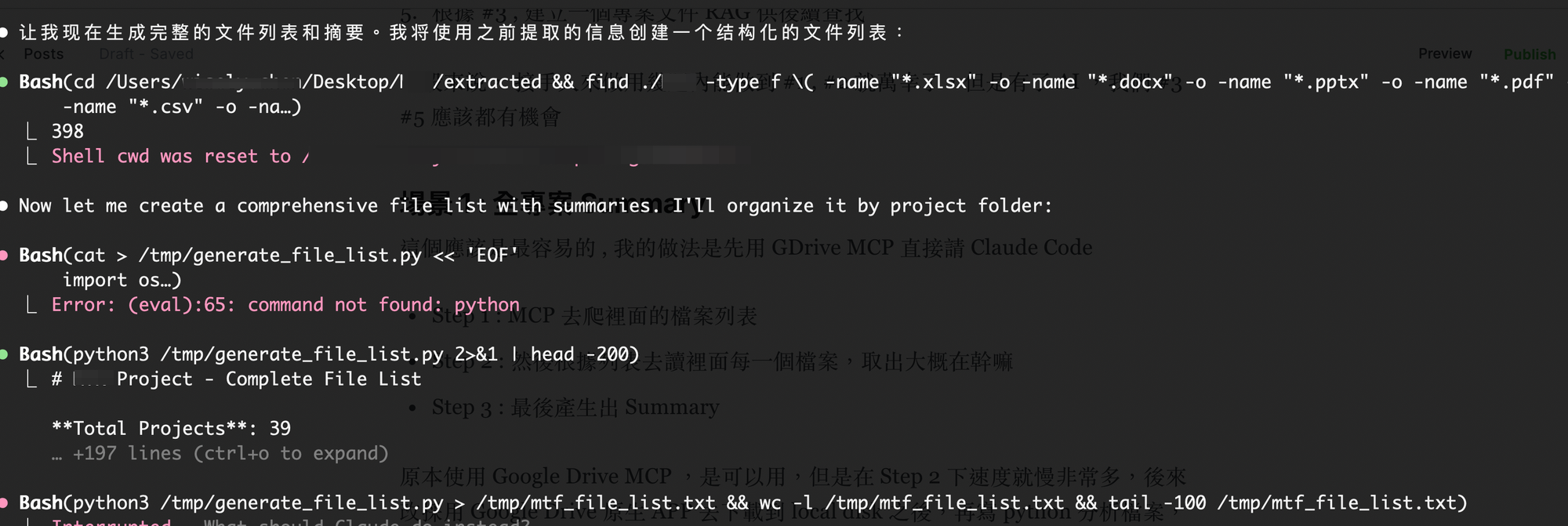 Claude Code using lots of Unix commands
The summary output was excellent: every file had actually been “read” by AI (something humans basically can’t do at this scale), and it produced a clear summary.
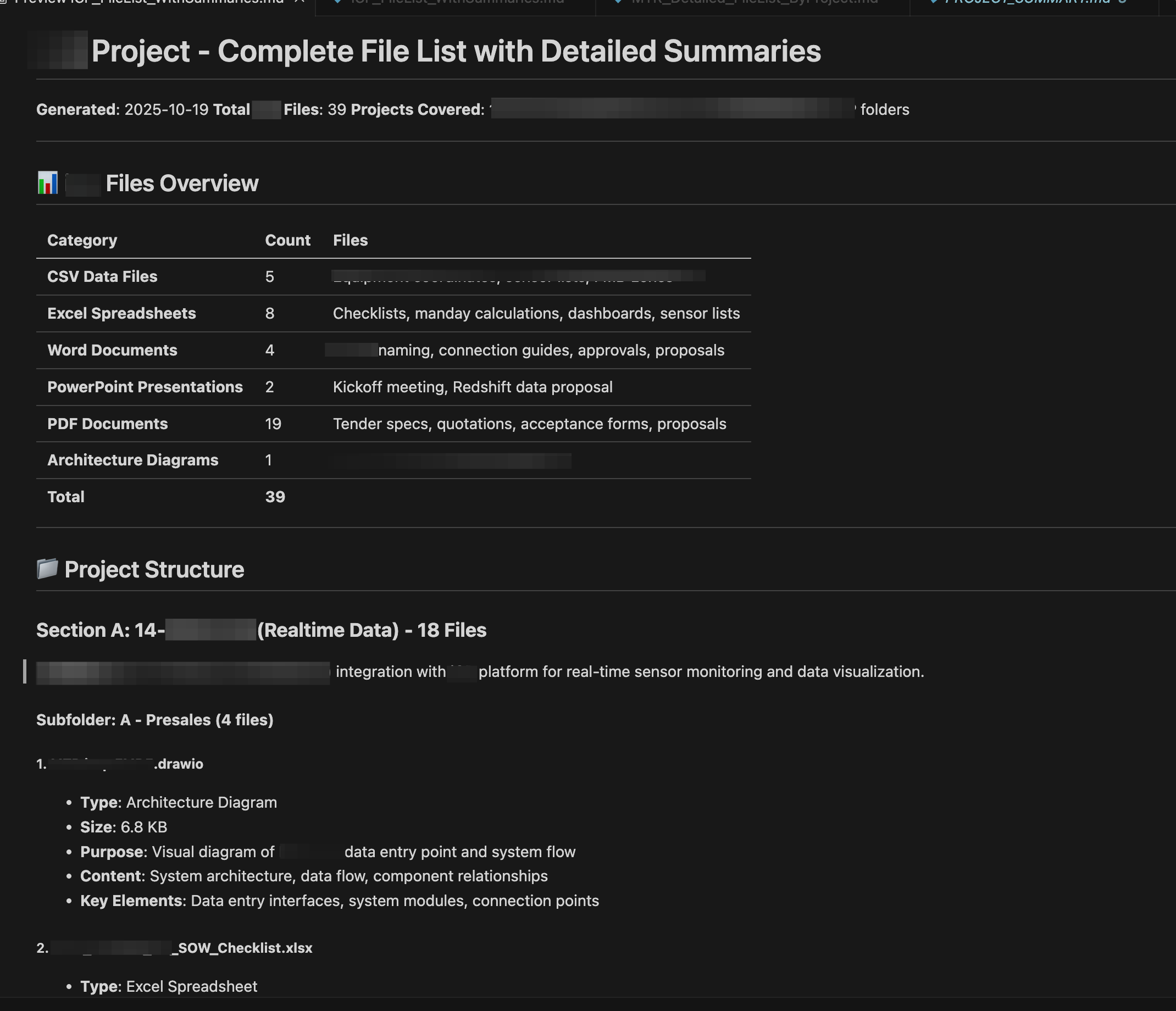
Bonus: I also tried Gemini from the Google Drive side-panel UI. Sadly, Gemini’s native results were poor—its folder counts were way off, let alone the summary quality.
Scenario 2: A master timeline across all projects
As I said, this is a huge client with documentation for 50+ projects. I asked Claude Code to find all documents containing project timing information and roll them up into one massive historical timeline.
A human can do this, but you’d need someone who deeply understands the projects. For someone newly taking over, a timeline is incredibly helpful for building understanding.
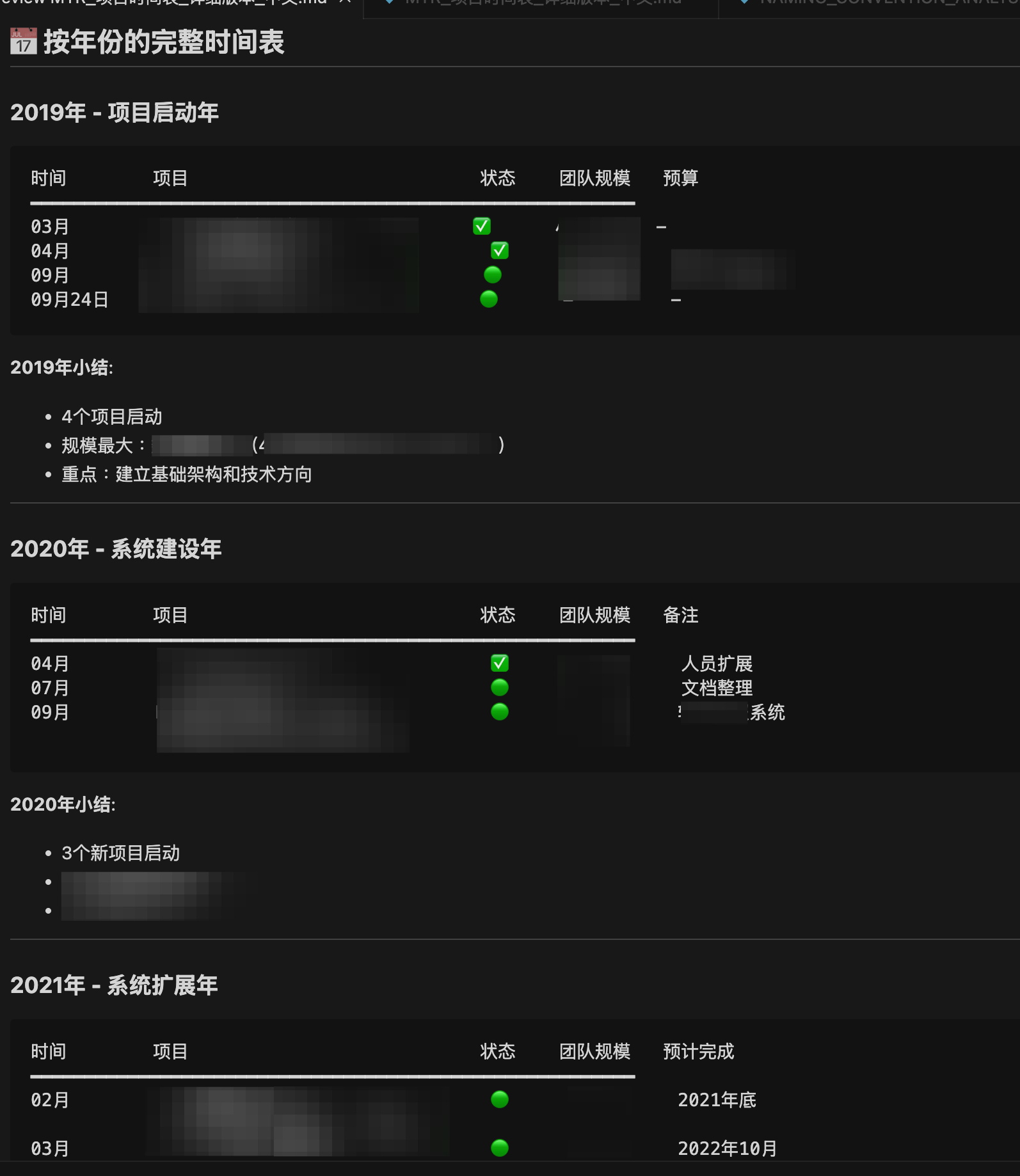
Scenario 3: A master technical “line” / tech-stack summary
This is also straightforward with Claude Code. The prompt is basically: “List the tech stacks used in each project, by project, then summarize for this client.” It helps us quickly see what technologies are in play if something breaks.
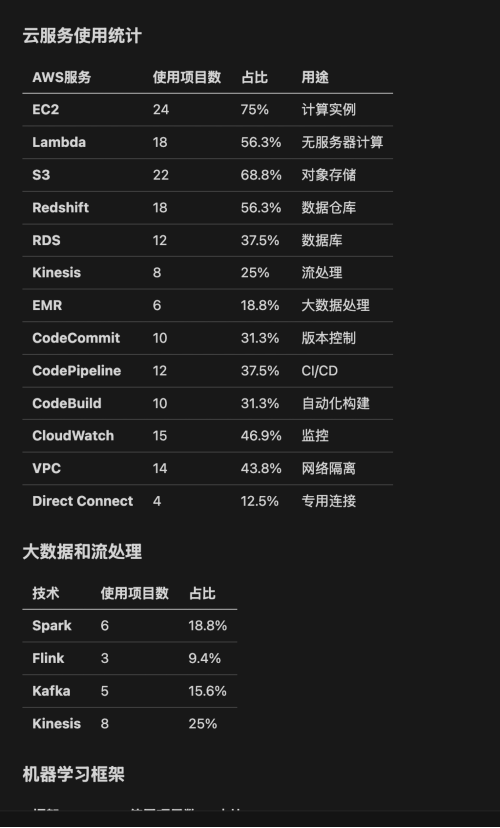
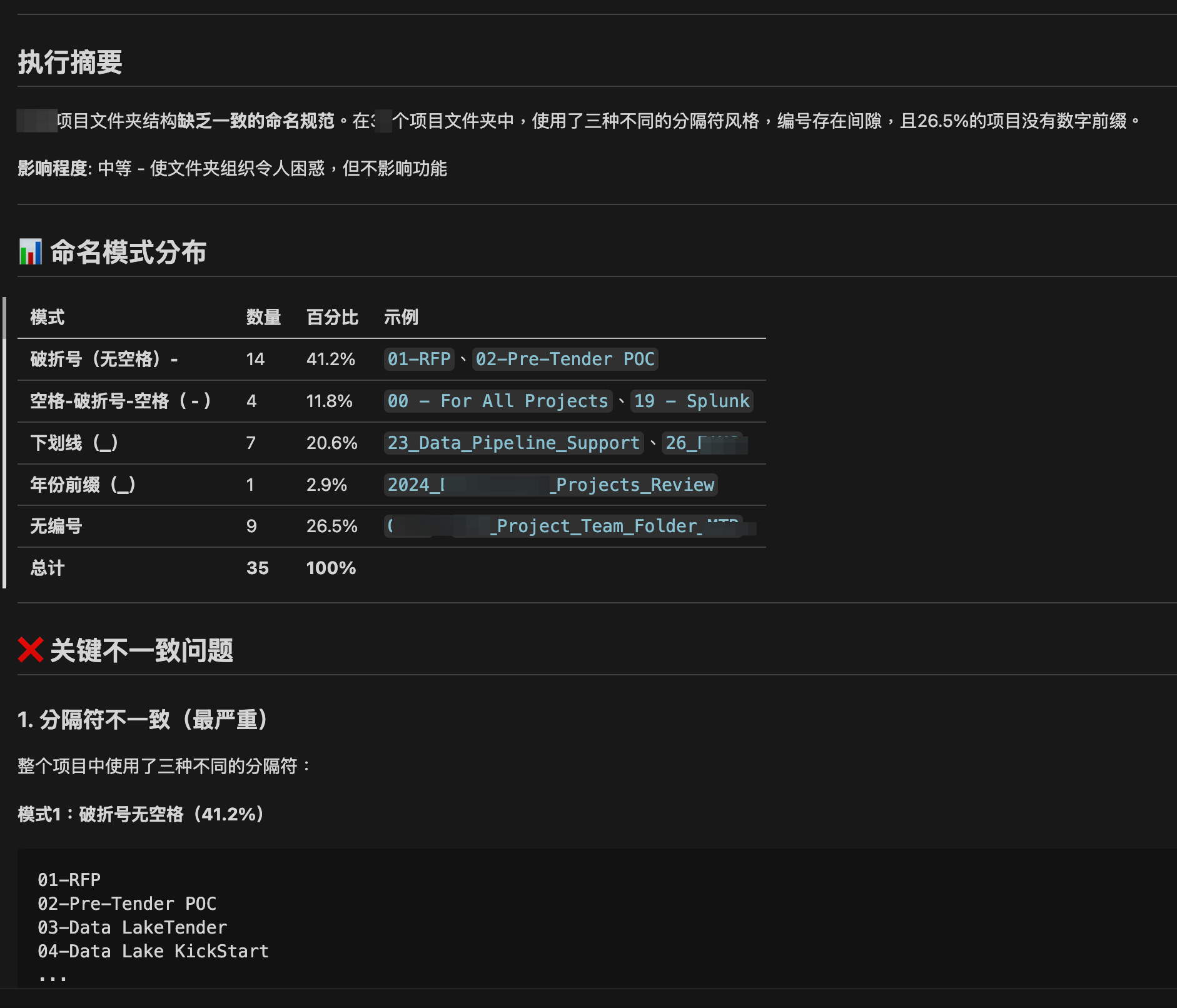
Scenario 4: A summary of folder naming conventions across projects
As a PM you already know: different PMs, different naming rules. I used this chance to aggregate and analyze the inconsistencies. Once we fully take over and clarify ownership, we can ask Claude Code to use Google Drive MCP to adjust folder structure / naming.
Final thoughts: AI isn’t here to take your job—it’s here to level you up
From this test, my biggest takeaway is: AI agents really push PM productivity to another level.
The right use of AI is to complement what humans are bad at. In handovers like this, just reading docs can take weeks, not to mention building timelines and tech-stack views—things you “want to do” but never have time for. With Claude Code, not only do the basic tasks become faster and more accurate, even the deeper analyses that used to be impossible become doable.
But this doesn’t mean PMs can rely entirely on AI. The time AI saves should be spent on higher-value work: “getting people aligned.” A PM’s most important job is to align the people in the system (customers, team, partners). Detailed documentation is just foundational work.
One more conclusion: an agent like Claude Code can do a lot of work that’s very different from VIBE Coding. If you’re a PM or engineer facing a similar document hell, I genuinely recommend trying Claude Code. It’s not just a tool—it’s a partner that helps you upgrade from “grinding through work” to “making efficient decisions.”