500 AI Assistants Exposed on the Public Internet: The Clawdbot 0.0.0.0 Configuration Disaster
Disclaimer: This post is machine-translated from the original Chinese article: https://ai-coding.wiselychen.com/clawdbot-exposed-500-servers-security-disaster/
The original work is written in Chinese; the English version is translated by AI.
With the explosion of AI agent technology, many developers and enthusiasts have been spinning up their own assistants. A popular open-source tool, Clawdbot, recently became the center of attention—but not because of its features. It’s because of its extremely dangerous default configuration.
According to the latest internet scanning data (Shodan), there are currently nearly 1,000 Clawdbot servers directly exposed to the public internet. Most of these servers have no authentication protection, which means:
Anyone who knows your IP and port can take over your AI—and even steal sensitive files on your machine.
If you’re running Clawdbot on a Mac mini or server, check your configuration immediately.
What happened?
The fatal default: 0.0.0.0:18789
By default, when Clawdbot starts up, it binds its Gateway service to 0.0.0.0:18789.
For non-networking folks, this looks like just a string of numbers. In security, 0.0.0.0 means: open to the entire world.
| Bind address | Meaning | Risk |
|---|---|---|
127.0.0.1 |
Only the local machine can connect | Safe |
0.0.0.0 |
Any network interface can connect | Dangerous |
Correct practice: local dev tools should bind to 127.0.0.1 (loopback / localhost).
Reality: because the default is public-facing and there’s no hard requirement to set a login token/password, anyone scanning port 18789 can connect.
This isn’t a “bug.” It’s a design decision—and a very dangerous one.
A subtler trap: reverse proxies make auth meaningless
Even if you bind to 127.0.0.1, there’s an even subtler issue.
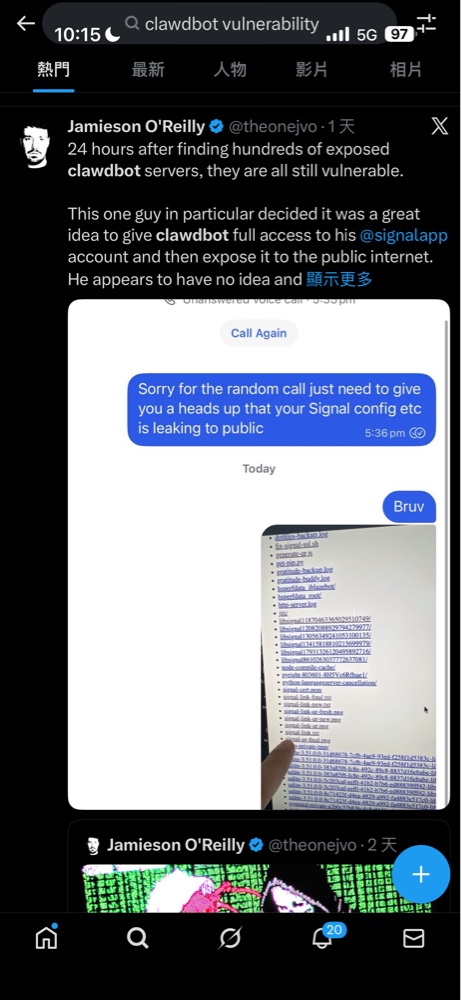
Security researcher Jamieson O’Reilly (@theonejvo) found the root cause is that the system trusts connections that appear to come from local (127.0.0.1) by default.
He described it like this:
Imagine you hired a butler. He’s smart: manages your calendar, handles your messages, screens your calls. He knows your passwords—because he needs to; he reads your private messages—because it’s his job; he has keys to everything—otherwise how could he help you?
Now imagine you come home and the front door is wide open, and the butler is happily pouring tea for random strangers who walked in off the street—while one of them sits in your study reading your diary.
That’s essentially what he found—hundreds of Clawdbot servers exposed directly to the public internet.
Here’s the problem: when you use a reverse proxy like Nginx or Caddy, external traffic is “forwarded” locally. From Clawdbot’s perspective, those requests appear to come from 127.0.0.1—and get misclassified as trusted local traffic.
Result: authentication is effectively bypassed.
1
External attacker → Nginx (reverse proxy) → 127.0.0.1:18789 → Clawdbot treats it as local → auto-approve ✓
More technically: Clawdbot has a trustedProxies config option, but it is empty by default. When it’s empty, the Gateway ignores the X-Forwarded-For header and uses the socket address. Behind a reverse proxy, that socket address is always loopback.
This means:
- Even if you set a token, attackers may bypass it
- Attackers can execute shell commands as root (O’Reilly tested
whoamiand gotroot) - Attackers can use prompt injection to induce malicious actions
- Attackers can manipulate what you see—filter content, alter replies, making you think everything is normal
If you use a reverse proxy, configure gateway.auth.password or gateway.trustedProxies immediately.
A real example: Signal chats and API keys exposed
In O’Reilly’s investigation, he found a particularly ironic case.
A user who called themselves an “AI Systems Engineer” connected Clawdbot to their Signal account—marketed as one of the most secure encrypted messengers.
What happened?
O’Reilly found a Signal device pairing URI on the server. What does that mean?
If someone opens that link on a phone with Signal installed, they can pair to the account and gain full access. All of Signal’s cryptographic protection becomes meaningless—because the pairing credential is sitting in a temporary file readable by the entire internet.
He also found:
- Attackers could access sensitive file system data
- API keys and private keys in
.envfiles were completely exposed - Anthropic API keys, Telegram bot tokens, Slack OAuth credentials—you name it
And it’s only the tip of the iceberg. According to the investigation, attackers could access far more:
| Data type | Risk |
|---|---|
| API keys & OAuth credentials | Keys for OpenAI, Anthropic, Google, and more |
| Slack DMs | months of work conversations and confidential discussions |
| Telegram chats | private groups and channel content |
| Discord messages | community chat and DMs |
| Signal conversations | even “the most secure” messenger gets fully exposed |
| WhatsApp messages | personal and business conversations |
| System config files | SSH keys, DB connection strings, cloud credentials |
This is effectively handing over your digital assets.
Worse: the user might still have no idea their data has been exposed—no warnings, no logs, no notifications.
The attacker simply “used” a public-facing service.
An even worse case: a crypto wallet drained
While writing this post, an even more painful example appeared on Twitter:
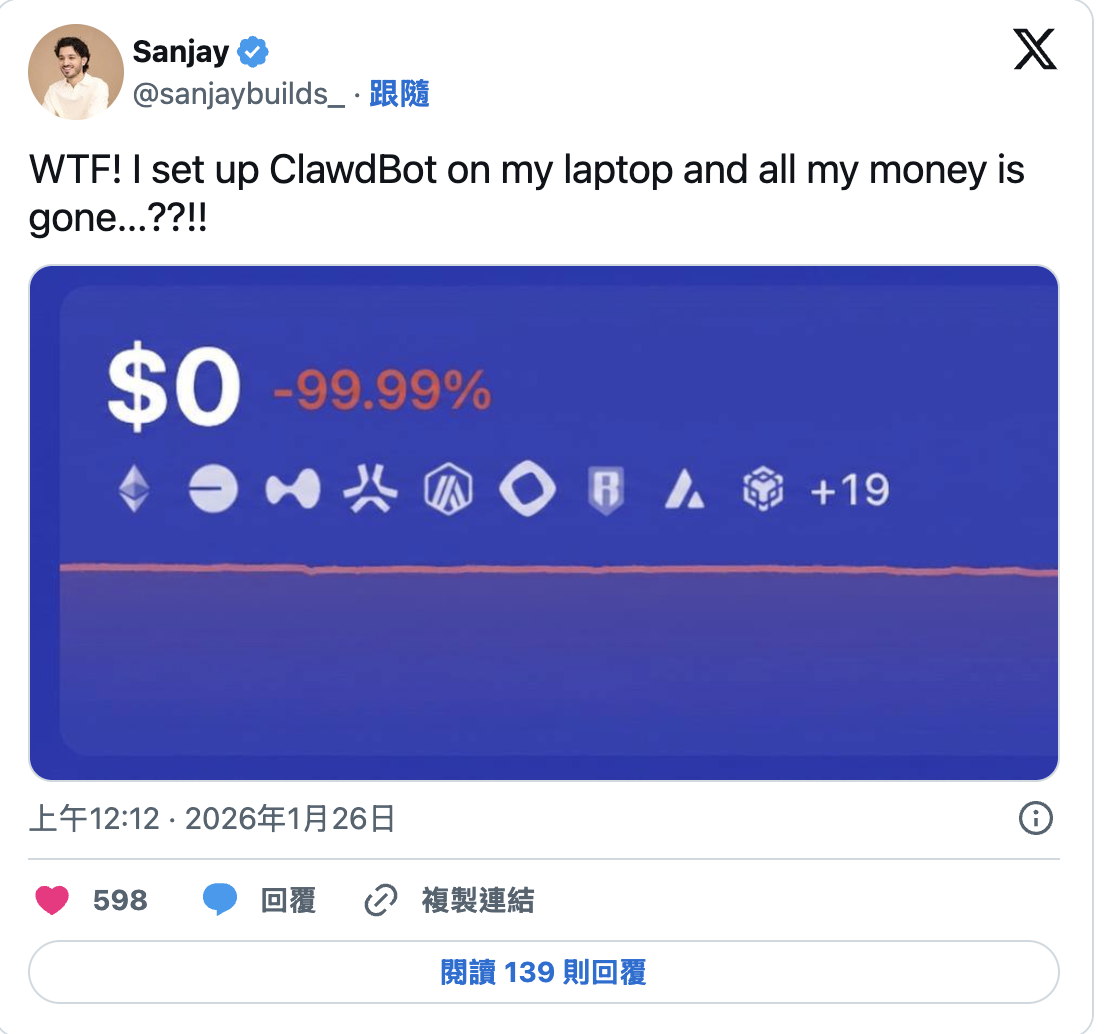
User @sanjaybuilds_ posted on Jan 26, 2026:
“WTF! I set up ClawdBot on my laptop and all my money is gone…??!!”
The screenshot showed their wallet balance: $0, down -99.99%.
This isn’t an exaggeration. When your Clawdbot can access:
- private key files for your crypto wallet
- MetaMask (or other wallet) config
- seed phrases or API keys stored in
.env
an attacker only needs to read those files through your exposed Clawdbot to transfer out all assets.
Lessons from this case:
- AI agents have far more privileges than you think—they can read any file on your machine
- Crypto is irreversible—there’s no bank support to undo a transfer
- “I’m just trying it out” is dangerous—attackers don’t care that you’re a beginner
598 likes and 139 replies suggest this isn’t a one-off. How many others are going through the same thing but don’t want to say it?
The Shodan “hunting list”
With a simple Shodan search for clawdbot, you can easily find exposed hosts from the US, Germany, and even Taiwan.
Host details are right there:
- paths
- version
- OS
- exposed API endpoints
Attackers don’t need sophisticated skills. This isn’t “hacker stuff”—it’s “Google search” difficulty.
How to save yourself: a Clawdbot hardening guide
If this is your machine, stop the service immediately and follow these steps.
Basic triage (do this now)
Edit your config (typically config.yaml or environment variables) and apply the two most critical changes:
1) Lock the bind scope (bind to loopback)
Problem: Gateway exposed on 0.0.0.0
Fix: bind to local loopback
1
gateway.bind: "loopback"  # or 127.0.0.1
2) Enable authentication
Problem: anyone can connect
Fix: enforce token auth
1
gateway.auth.mode: "token"
Then set a strong token via environment variable:
1
export GATEWAY_AUTH_TOKEN="your-strong-secret"
Note: if you use a Control UI or webhooks, ensure they also listen on localhost only, or access them via an internal VPN overlay such as Tailscale. Never open ports directly to the public internet.
Extra insurance: assume you’ve already been scanned
After basic triage, a few more steps can help you sleep:
1) Run built-in security checks
Clawdbot actually has a built-in security scanner—many people just don’t know it:
1
2
3
4
5
# Basic health check
clawdbot doctor

# Deep security audit (auto-fixes some issues)
clawdbot security audit --deep --fix
This checks:
- whether bind addresses are safe
- whether tokens are set
- whether sandboxing is enabled
- whether permissions are excessive
Recommendation: run this after every Clawdbot update.
2) Need remote access? Tunnel it—don’t open ports
If you truly need to access your home/office Clawdbot remotely, do not open ports.
Use a tunneling solution so your port isn’t publicly visible, while you can still connect:
| Option | Characteristics | Price |
|---|---|---|
| Cloudflare Tunnel | zero-config, free, enterprise-grade security | Free |
| Tailscale | P2P encryption, private network across devices | Free (personal) |
| ngrok | dev/testing, temporary URLs | Free (limited) |
Suggested combo: Cloudflare Tunnel (stable) + Tailscale (multi-device)
Your Clawdbot stays invisible to the public internet, but you can still connect via your-subdomain.yourdomain.com.
3) Force a token (not “recommended”—required)
Even if you bind to localhost, still set a token.
Because:
- other local programs might be compromised
- malicious web pages can target localhost (CSRF)
- another layer of defense is always good
1
2
3
4
5
# Generate a strong token (32-char random string)
export GATEWAY_AUTH_TOKEN=$(openssl rand -base64 32)

# Or write it into config
echo "gateway.auth.token: \"$(openssl rand -base64 32)\"" >> ~/.clawdbot/config.yaml
4) If you were exposed, stop the bleeding
If your Clawdbot was exposed for any amount of time (even hours), assume the worst case.
Rotate all API keys immediately:
1
2
3
4
5
6
7
# Check which keys exist in your .env/config
cat ~/.clawdbot/.env | grep -i "key\|token\|secret"

# Re-generate in the relevant dashboards:
# - OpenAI: https://platform.openai.com/api-keys
# - Anthropic: https://console.anthropic.com/settings/keys
# - Others...
Check for abnormal use:
- review usage dashboards for unusual traffic
- check Clawdbot session logs for conversations you didn’t initiate
- check file access records (if auditing is enabled)
Reset OAuth connections:
If your Clawdbot is connected to Google/GitHub/Slack/etc., consider revoking and re-authorizing.
Advanced hardening: top 10 issues and fixes
Locking down IP alone isn’t enough. For long-term safe operation, implement the following:
| Risk | Issue | Fix |
|---|---|---|
| High | Gateway exposed to the public internet | Set gateway.auth.token and bind to localhost |
| Medium | DM policy allows all users | Set dm_policy to an allowlist and restrict to specific users |
| High | Sandbox disabled by default | Enable sandbox=all and set docker.network=none to block outbound |
| Medium | Credentials stored in plaintext (oauth.json) |
Use env vars and set file permissions to chmod 600 |
| Medium | Prompt injection | Wrap untrusted input with isolation labels/tags |
| High | Dangerous commands not blocked | Block rm -rf, curl pipes, git push --force, etc. at the policy layer |
| High | No network isolation | Use Docker network isolation to prevent lateral movement |
| High | Tools overly privileged | Restrict MCP tools to the minimal necessary scope |
| High | Audit logs disabled | Enable full session logging for forensics |
| Medium | Weak pairing codes | Use cryptographically strong randomness + rate limiting |
Priorities
If you’re short on time, do at least the first three:
- Bind to localhost (5 min)
- Enable token auth (5 min)
- Enable sandboxing (10 min)
These three alone move you from “naked on the internet” to “basic protections.”
Frankly: a negative example of secure defaults
This Clawdbot incident is a textbook counterexample to Security by Default.
The developer problem
To make tools “out of the box,” developers often sacrifice safety.
I understand the mindset—you want users to be running in 5 minutes, not spend 30 minutes reading docs and configuring firewalls.
But: most users won’t change defaults. They assume: “If the official default is like this, it must be safe.”
In the 2026 AI-agent era, that assumption can be expensive.
The user problem
Users often skip configuration checks to “try it out.”
“I’ll get it running first,” “it’s only on my LAN,” “who would attack a small fish like me”—I’ve heard all of these.
But in reality:
- Shodan doesn’t care whether you’re a company or an individual
- scanners don’t skip you because you’re “small”
- once your agent is taken over, the attacker gets your identity, your privileges, your data
The special risk of AI agents
AI agents can:
- read/write your files
- execute commands
- send messages as you
- access every connected service
These tools have huge privilege, and when they fail, the impact is worse than a typical website hack.
If a website is hacked, attackers get website data. If an agent is taken over, attackers get your digital twin.
Conclusion
Don’t punch a hole for others to use.
Go check your port 18789—right now.
What this incident teaches:
- Defaults matter: developers should make security the default, not an optional add-on
- Users must self-rescue: don’t assume defaults are safe
- AI agents need stricter security standards: their privileges are far beyond traditional apps
If you run any AI agent service, ask yourself:
- What IP is it bound to? (should be
127.0.0.1) - Is there authentication? (should be a token)
- Are there audit logs? (should exist)
If your answer is “I don’t know,” that itself is risk.
FAQ
Q: I run Clawdbot on my LAN. That should be fine, right?
Not necessarily. If other people share your network (coworkers, roommates, a cafe network), they can access it. Worse, if your router has UPnP or port forwarding, your “LAN” may already be exposed. Recommendation: even on a LAN, enable token authentication.
Q: I was exposed for a while. How do I know if I was attacked?
Check: (1) Clawdbot session logs for conversations you didn’t initiate; (2) file system for signs of reads/changes; (3) .env and API keys usage dashboards for suspicious usage. If anything is suspicious, rotate all API keys immediately.
Q: Why would the developer set the default to 0.0.0.0?
Usually for convenience—so users can connect from other devices, or to make Docker setups simpler. But that convenience sacrifices safety. The correct approach is defaulting to 127.0.0.1, and requiring users who truly need exposure to opt in.
Q: What is Tailscale, and why recommend it?
Tailscale is a zero-config VPN overlay that creates a secure private network between your devices. If you need remote access, it’s far safer than opening a public port because traffic is encrypted and limited to your devices.
Q: Is this only a Clawdbot problem?
No. Many open-source AI agent tools have similar issues. I previously mentioned broad problems across the AI IDE ecosystem (the IDEsaster report found 100% of tested AI IDEs had vulnerabilities). Clawdbot is simply the one that got exposed at scale. If you run other agent services, do the same safety checks.