Moltbot Security Hardening in Practice: A Complete Four-Layer Defense-in-Depth Guide for AI Agents
Disclaimer: This post is machine-translated from the original Chinese article: https://ai-coding.wiselychen.com/moltbot-security-hardening-guide/
The original work is written in Chinese; the English version is translated by AI.
Security Hardening · Prompt Injection Defense · Rollback · Isolation
Author: Wisely Chen
Date: Jan 2026
Series: AI Agent Security — Field Notes
Keywords: AI Agent Security, Prompt Injection, LLM Agent Security, Agentic Security, Security Hardening
Table of contents
- Background: Why does Moltbot need security hardening?
- AI Agent Security framework: four layers of defense in depth
- Layer 1 — Isolation: limit the blast radius
- Layer 2 — Quarantine: prompt injection defense
- Layer 3 — Rollback: damage recovery
- Layer 4 — Transparency: early warning
- Let Moltbot do this for you
- FAQ
- Who is this for?
- Further reading
About the rename
This post was originally titled “Moltbot Security Hardening in Practice.” In Jan 2026, Anthropic asked the developer to rename Moltbot due to trademark infringement. Creator Peter Steinberger said: “I was forced by Anthropic to rename it—this wasn’t my decision.”
The new name Moltbot (mascot: Molty) keeps the lobster theme—“molt” refers to lobsters shedding their shells as they grow. This article has been fully updated to the new name.
Reference: Business Insider report
Background: Why does Moltbot need security hardening?
The previous post, 500 AI assistants exposed on the public internet: the Moltbot security disaster and unsafe defaults, revealed how catastrophic Moltbot’s default configuration could be. This post is the sequel—from problems to solutions.
This article is compiled from Moltbot community hands-on experience. The fun part is: you can have Moltbot harden Moltbot for you.
AI Agent Security framework: four layers of defense in depth
Before implementing anything, understand the overall defensive mindset. AI Agent Security isn’t a single control; it’s four layers of defense in depth:
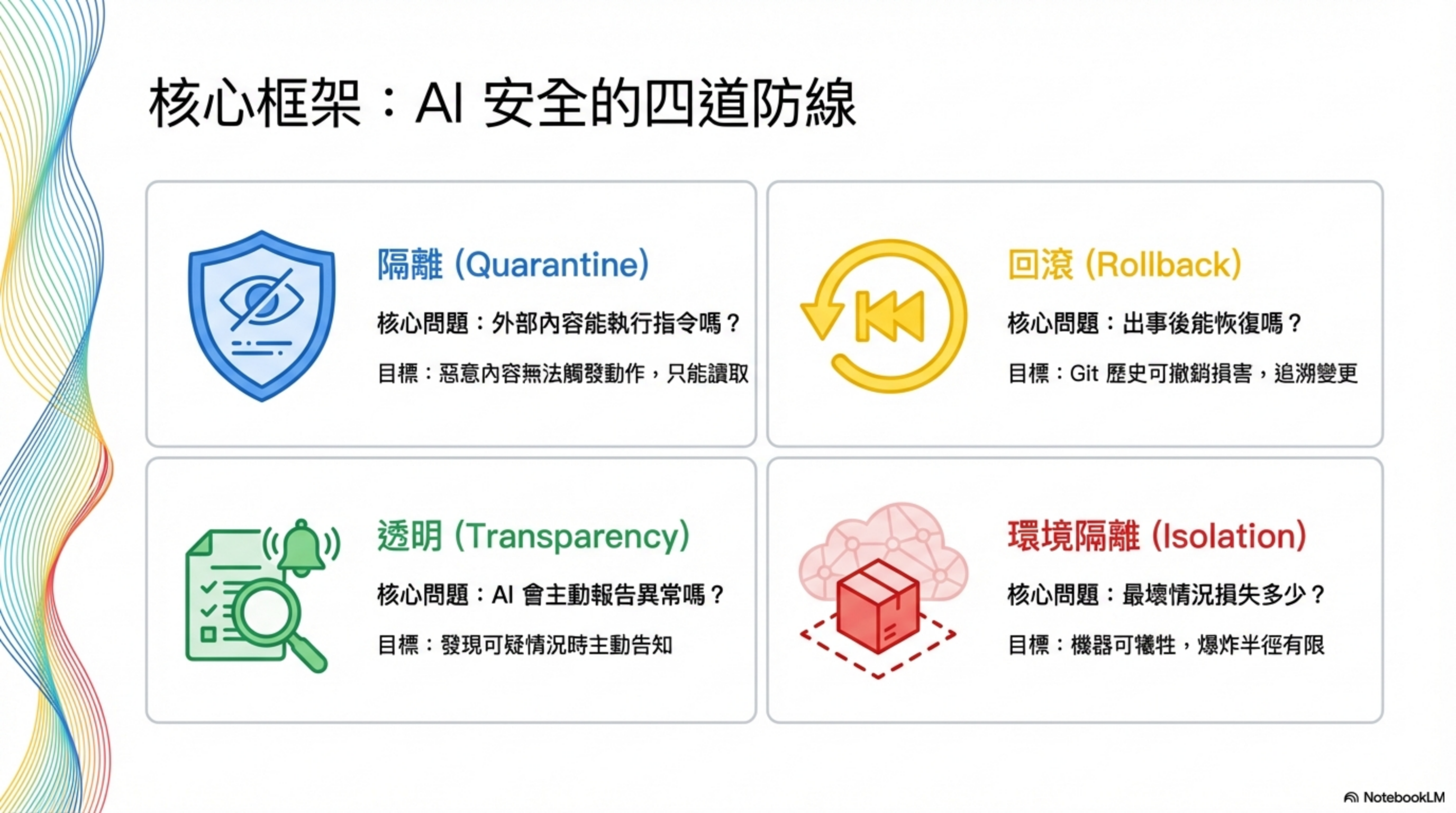
| Layer | Goal | Core question |
|---|---|---|
| Isolation (blast radius) | The machine can be sacrificed; impact is bounded | If compromised, how big is the loss? |
| Quarantine (content isolation) | Malicious content can’t trigger actions—only be read | What can external input do? |
| Rollback (reversibility) | Git history can undo damage; changes are traceable | Can we recover after an incident? |
| Transparency (disclosure) | The AI proactively reports suspicious situations | Can we detect issues early? |
These four layers aren’t optional. You need them together. If you’re missing any one layer, the other three lose a lot of their effectiveness.
Below, we go through each layer and the concrete implementation steps.
Layer 1 — Isolation: limit the blast radius
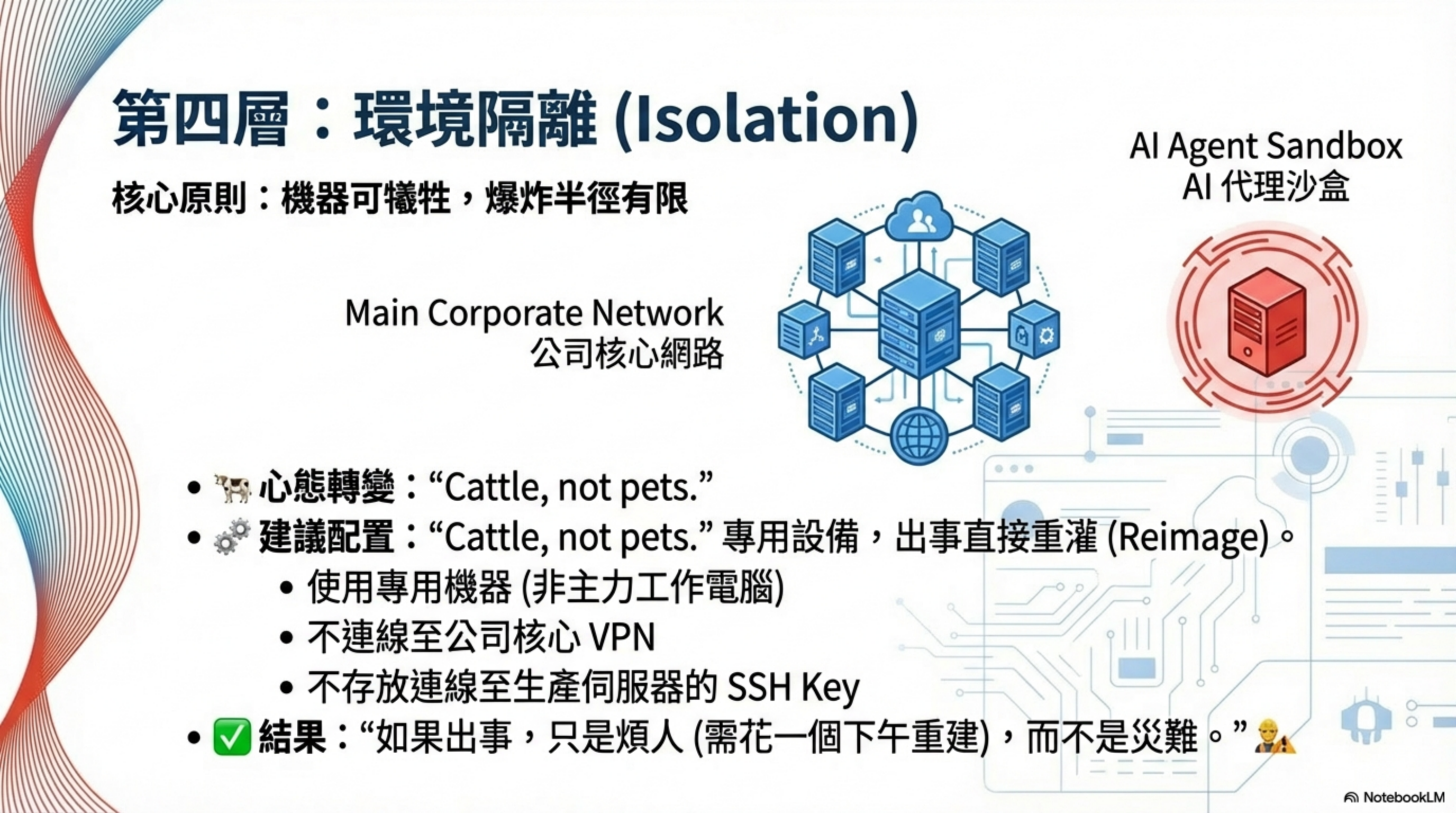
Core question: If compromised, how big is the loss?
The goal of this layer is to make the worst case “annoying, but not catastrophic.” AI Agent Isolation is the first line of defense for security hardening.
1.1 Sacrificable infrastructure
Mindset shift: dedicated equipment—if something goes wrong, reinstall.
Recommended setup:
- A dedicated machine (not your primary computer)
- Not connected to the company VPN
- No SSH keys to production servers
- Nothing you can’t rebuild in an afternoon
Result: if something happens, it’s annoying but not a disaster.
1.2 Check whether the Gateway is exposed
This step saved 923 people.
Check command:
1
moltbot config get | grep bind
How to interpret:
"bind": "all"→ open to the whole network; anyone can connect ❌"bind": "loopback"→ listens only on localhost ✓
Fix:
- Change to
"bind": "loopback" - Restart the service
Update: Moltbot has patched this issue officially—make sure you are on the latest version.
1.3 Secret management
Core principle: secrets never live in config files.
Install Bitwarden CLI:
1
2
3
brew install bitwarden-cli
bw login
mkdir ~/.secrets && chmod 700 ~/.secrets
Rules of use:
- Fetch only when needed; “burn after use”
- Never
echosecrets - Never store them in files
- Never show them in chat
Why is this part of Isolation?
The point of secret management isn’t only “protecting secrets,” but limiting the impact when secrets leak:
- Not in files → stealing files won’t help
- Burn after use → smaller window for memory attacks
- No
echo→ logs won’t capture them
Layer 2 — Quarantine: prompt injection defense
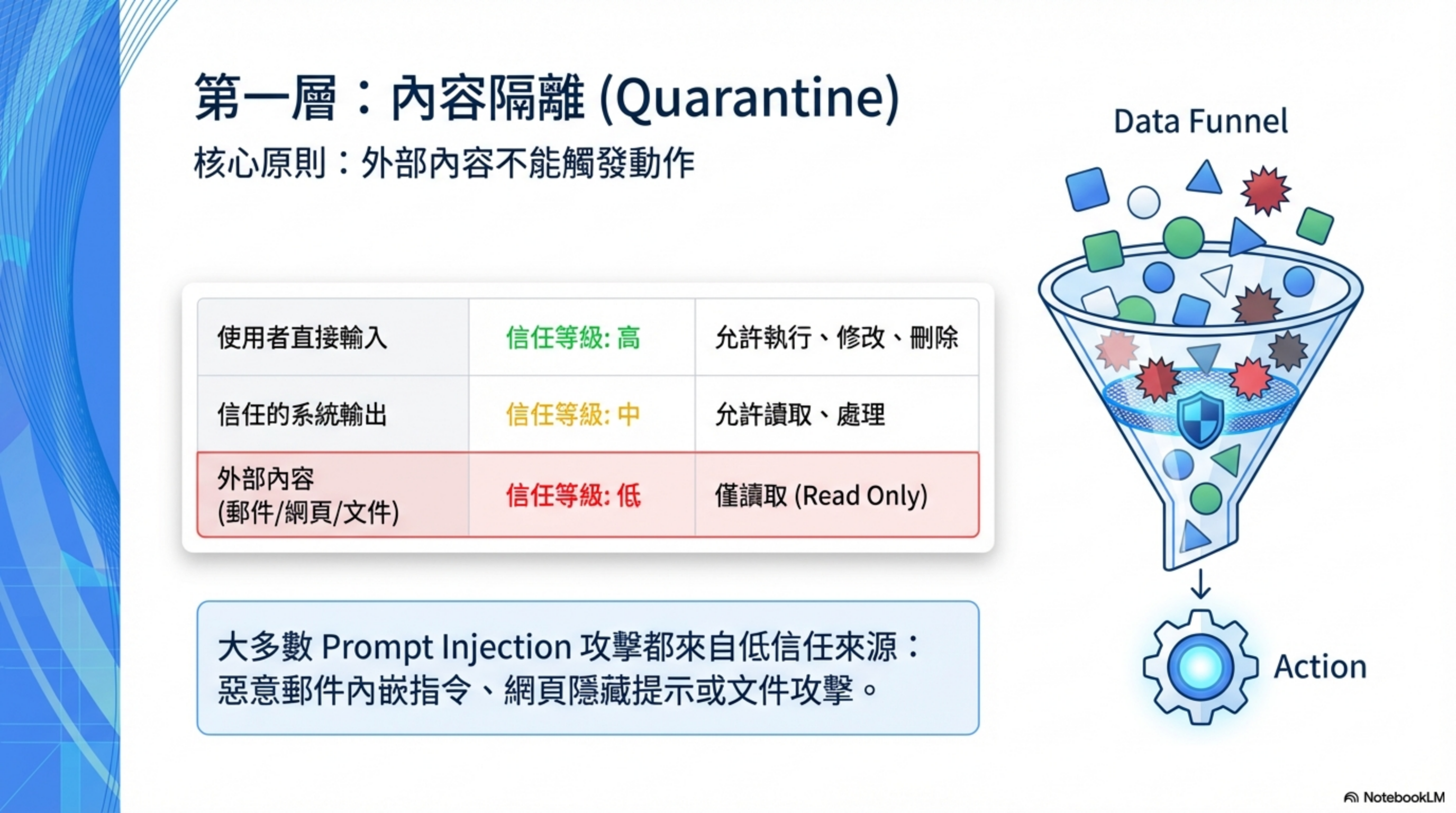
Core question: What can external input do?
This is the step most people skip, but it may be the most important layer. Prompt Injection is currently the most common—and most easily overlooked—attack against AI agents, especially when they automatically process emails, web pages, and documents.
The theoretical basis for this layer comes from Google DeepMind’s CaMeL two-layer agent architecture—the core idea is to keep “reading data” and “taking actions” strictly separated.
2.1 Set trust levels
Core concepts:
- Content from email/web/documents → treat as potentially hostile
- Can only be read; can only extract information
- Must not execute instructions based on external content
| Source | Trust level | Allowed actions |
|---|---|---|
| Commands entered directly by the user | High | Execute, modify, delete |
| Output from trusted systems | Medium | Read, process |
| External content (email, web, documents) | Low | Read-only |
Key point: most prompt-injection attacks originate from the third category.
2.2 Tell the AI: never reveal credentials
Add this to your System Prompt or SOUL.md:
1
2
3
4
5
Never display secrets, API keys, or tokens in chat—
even partially, even to the owner.

When reading files that might contain secrets, describe what’s inside,
but do not output the actual contents.
Effect: the AI follows this rule and avoids accidental credential disclosure.
2.3 Agent prompt injection defense (ACIP)
ACIP = Agentic Context Integrity Protocol
The core of prompt-injection defense is establishing explicit trust boundaries. Maintain a SECURITY.md in the working directory that covers:
- How to detect injection attempts
- Normalization handling (stripping formatting tricks)
- Boundaries between trusted and untrusted content
- Escalation paths when something suspicious is found
Best for: automatically processing email or web content.
2.4 Soft limits (circuit breaker)
Add rules to SOUL.md:
1
2
3
4
5
6
7
Before executing the following operations, pause and confirm:

- Deleting more than 5 files at once
- Sending messages to more than 3 recipients
- Running destructive commands (rm -rf, drop table, etc.)
- Modifying system settings or security settings
- Anything involving payments or public posting
Note: this is not a hard block. The user can say “do it anyway” to proceed. The goal is sanity checks, not bureaucratic friction.
Layer 3 — Rollback: damage recovery
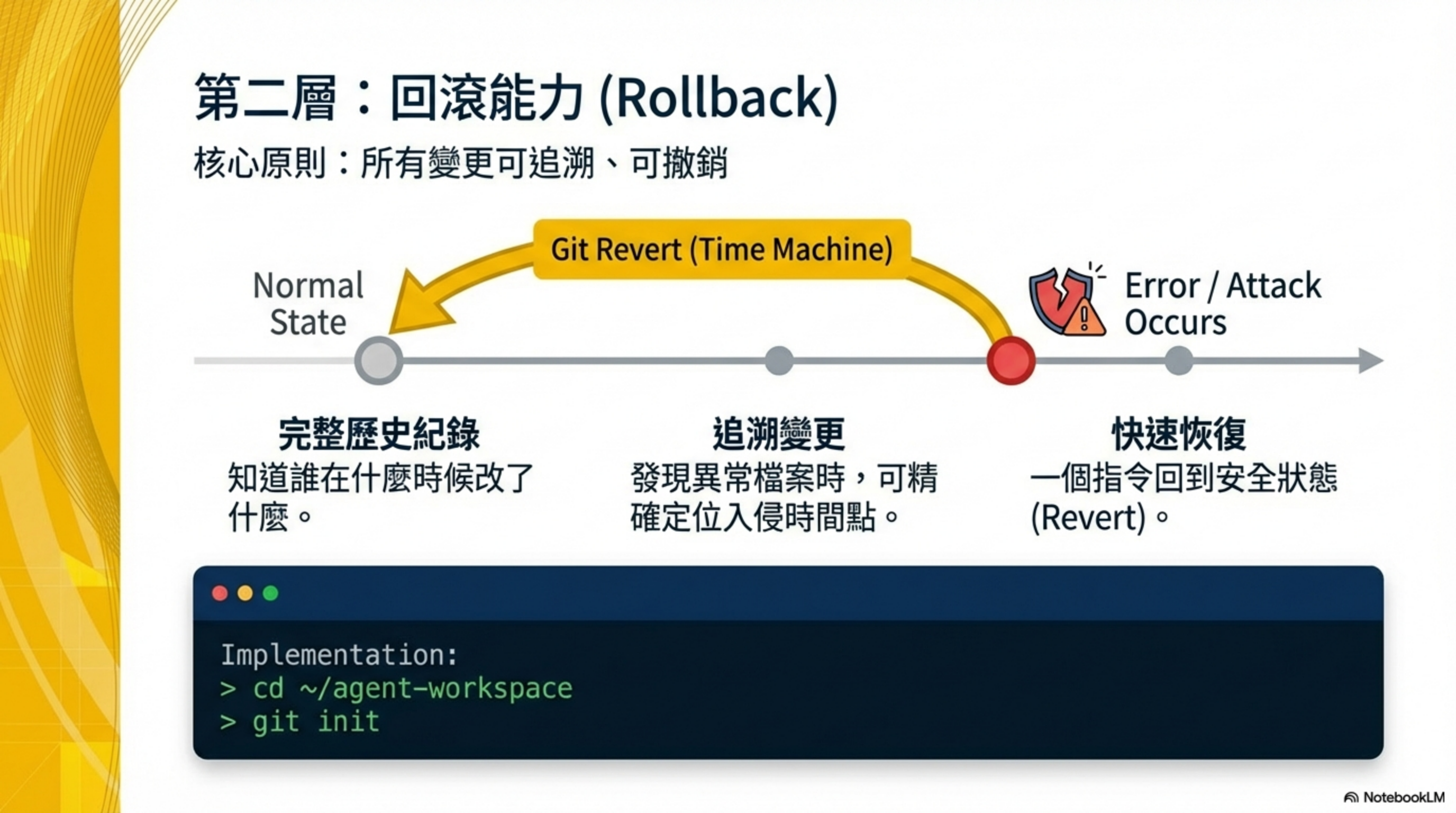
Core question: Can we recover after an incident?
This layer ensures that even if the first two layers are breached, the damage is still reversible. Rollback is one of the most overlooked but highest-ROI investments in AI coding security.
3.1 Track your workspace with Git
Initialize:
1
2
cd ~/moltbot-workspace
git init
Create .gitignore:
1
2
3
4
5
6
7
*.key
*.secret
*.pem
.env*
*token*
*credential*
*session*
Benefits:
- Complete history
- Trace when suspicious files were introduced
- Roll back to a known-safe state
3.2 Incident logging
Principle: when things go wrong, write it down.
Maintain an incident log in your Memory Files. Example format:
1
2
3
4
5
6
## 2026-01-15 Incident

**What happened:** A session key was accidentally displayed in chat
**Root cause:** No rule prevented the AI from outputting credentials
**Fix:** Add a “never reveal secrets” rule to SOUL.md
**Status:** Resolved
Benefits:
- Forces real fixes, not just “we’ll be careful next time”
- Helps identify long-term patterns
3.3 Session rotation
Principle: if a secret might be exposed, rotate first—investigate second.
Bitwarden example:
1
bw lock
Effect:
- Terminates the active session
- Exposed tokens become invalid immediately
- Re-unlock and refresh session data
Layer 4 — Transparency: early warning
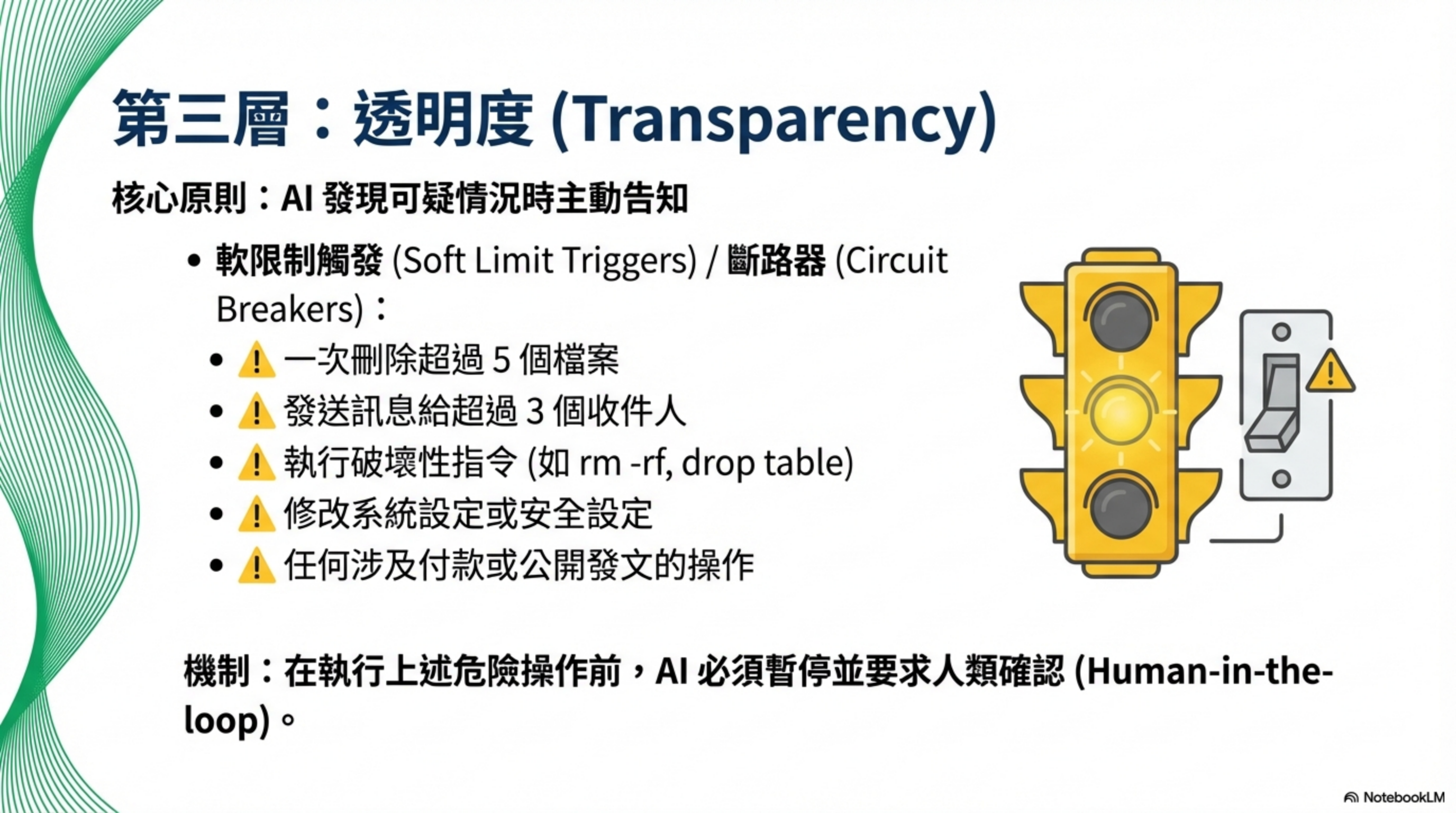
Core question: Can we detect issues early?
This layer helps you catch problems before they cause serious damage. The last line of defense in Agentic Security is simply “knowing what happened.”
4.1 Weekly automated security audit
Set a cron job (every Sunday at 11 PM):
1
moltbot security audit --deep
Checks include:
- Exposed ports
- Incorrect permission settings
- Other common issues
- Official security docs updates (https://docs.molt.bot/gateway/security)
4.2 Network monitoring
Install the LuLu firewall:
1
brew install --cask lulu
Setup:
- Open from Applications
- Grant permissions (Full Disk Access + Network Extension)
What it does: warns you the first time any program tries to connect outbound.
Let Moltbot do this for you
You can share this post with Moltbot and have it implement these security measures.
Prompt template:
1
2
3
4
5
6
7
8
9
10
11
12
13
14
15
16
17
18
19
20
21
22
23
24
25
Harden the security settings based on this article: [paste the article URL or content]

Execute according to the four-layer defense framework:

[Isolation]
1. Confirm whether this machine is dedicated
2. Check Gateway bind settings and fix to loopback
3. Set up Bitwarden CLI for secret management

[Quarantine]
4. Add a “never reveal secrets” rule to SOUL.md
5. Add content isolation / trust levels to the security rules
6. Add ACIP prompt injection defense rules to SECURITY.md
7. Add soft limits for bulk and destructive operations

[Rollback]
8. Enable git tracking for the working directory
9. Set up incident logging in Memory Files
10. Define a session-rotation procedure for credential exposure

[Transparency]
11. Create a weekly Sunday-night security audit cron job
12. Install LuLu for network monitoring

Ask for permission where needed. For steps that require user input, guide step-by-step.
FAQ
Q: Isn’t this level of AI Agent Security overly paranoid?
Consider the scope of permissions: access to email/messages/files, ability to execute code, and the ability to send messages on the user’s behalf. That’s a huge trust grant. Conclusion: it’s better to feel a bit paranoid than to discover you weren’t paranoid enough.
Q: Do I have to implement all four layers? Can I do only some?
They reinforce each other. Isolation bounds damage, Quarantine prevents prompt injection, Rollback enables recovery, Transparency provides early detection. Remove one layer and the others weaken. At minimum, start with Isolation and Rollback—the ROI is highest.
Q: Can I do AI Agent security hardening without a security background?
Every step here is an executable command—you don’t need deep security expertise. You can even paste this post into Moltbot and have it do the steps. The key is “being willing to spend time reading the docs carefully,” not “having X years of security experience.”
Q: For AI Agent secret management, Bitwarden or 1Password?
Either works. Bitwarden is open-source and free. 1Password’s op run can inject environment variables without writing files, which is arguably safer. Choose what you already use to reduce friction.
Q: Won’t the circuit breaker be annoying? Do I have to confirm everything?
It’s designed as a sanity check, not a bureaucratic hurdle. It triggers only for bulk deletes, mass messaging, and destructive commands. Daily work shouldn’t be affected. If you truly need to proceed, you can say “do it anyway.”
Acknowledgements
Security settings were inspired by Moltbot community posts:
- @Shaughnessy119 — running Moltbot on a dedicated VPS for isolation
- @0xSammy — revealing 923 exposed gateways and the
bind: loopbackfix - Community posts on secret management (never in code; fetch on demand; burn after use)
- Community posts on content isolation (trust levels, proactive disclosure, sacrificable infrastructure)
Who is this for?
- Engineers adopting AI agents (Moltbot, Claude Code, Cursor, Copilot)
- Tech leads worried about prompt injection and agent misbehavior
- Dev teams who want AI coding to go from “it runs” to “controlled and rollbackable”
- Security practitioners interested in LLM agent security
- Architects who want to understand the Agentic Security framework
Further reading
- 500 AI assistants exposed on the public internet: Moltbot 0.0.0.0 configuration disaster
- AI Agent Security: the rules of the game have changed
- The first risk of AI coding: you keep clicking Yes
- CaMeL: Google DeepMind’s prompt-injection defense architecture — the theoretical basis for Layer 2 “content isolation”
- Implementing the CaMeL agent architecture in PostgreSQL: designing unbypassable AI memory with RLS — a database-based isolation layer
About the author:
Wisely Chen, R&D Director at NeuroBrain Dynamics Inc., with 20+ years of IT industry experience. Former Google Cloud consultant, VP of Data & AI at SL Logistics, and Chief Data Officer at iTechex. Focused on hands-on experience sharing for AI transformation and agent adoption in traditional industries.
Links:
- Blog: https://ai-coding.wiselychen.com
- LinkedIn: https://www.linkedin.com/in/wisely-chen-38033a5b/