OpenClaw 2.0 Architecture Teardown: What Changed, How It Compares to Hermes, and What I Hope Comes Next
Disclaimer: This post is machine-translated from the original Chinese article: https://ai-coding.wiselychen.com/openclaw-2-it-architecture-six-months-operator-perspective/
The original work is written in Chinese; the English version is translated by AI.
Translation Note
This article is translated from the Chinese original. The author writes primarily in Traditional Chinese, and the original version is the canonical source — including the latest updates, comments, and follow-up discussions.
Read the Chinese original: OpenClaw 2.0 架構拆解:改了什麼、跟 Hermes 怎麼比、我的期許
If you spot any translation errors or have feedback, please refer to the Chinese version as the source of truth.
OpenClaw 2.0 just shipped. This is one of the marquee open-source projects of the AI era — 16,977 PRs, 987 contributors. The official title says it all: “OpenClaw 2.0, Accidentally” — they didn’t plan a major release, but by the time they looked back, the scope of changes was too large to call it anything else.
Time for another guaranteed-boring IT day. Here’s an IT architect’s teardown of what actually changed in OpenClaw 2.0.
What Changed in 2.0
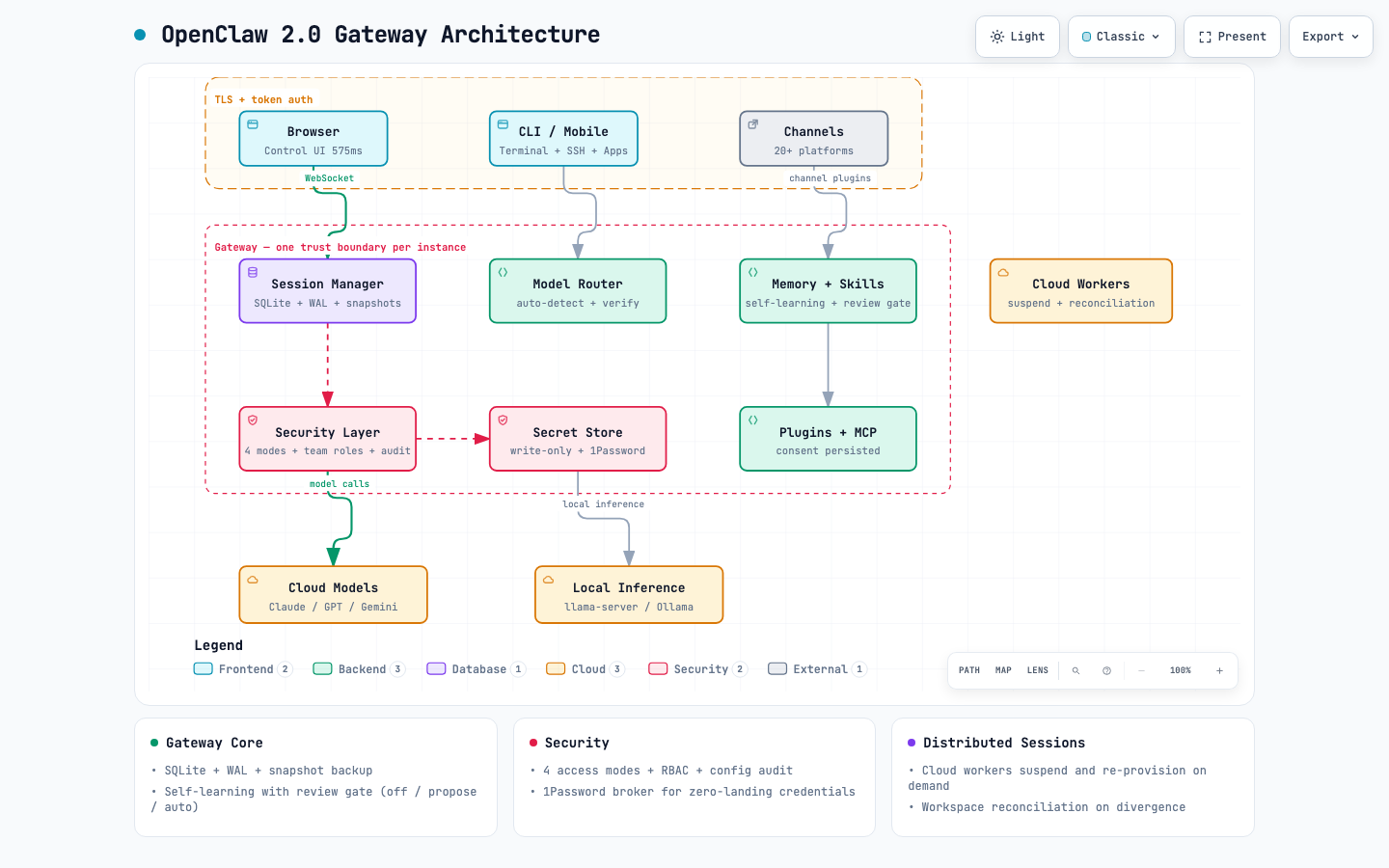
The biggest difference upfront: onboarding is dramatically simpler. The setup flow now auto-detects existing AI resources on the machine — signed-in ChatGPT or Claude CLI sessions, API keys, local models running through Ollama or LM Studio. Detected models must “prove they can answer a question” before being saved to configuration. The Control UI was also completely rewritten: JS requests dropped from 140 to 45, startup time from 1.6s to 575ms (tested with simulated default-chat, mocked Gateway, 50ms HTTP/1.1 latency).
Beyond that, the major architectural changes:
Session Storage Moved to SQLite
The filesystem-based session storage was one of OpenClaw’s most distinctive early design choices — and also a clear sign of its scrappy beginnings. 2.0 migrates all sessions and transcripts into SQLite with WAL (Write-Ahead Logging) mode and WAL split-brain protection.
Why does this matter? Because it’s a one-way door. New sessions after upgrade exist only in SQLite. Downgrading requires exporting via the current CLI first.
The upside is concurrency stability. File-based sessions were prone to lock contention and read-write conflicts, especially with large transcript volumes. SQLite’s atomic writes are substantially more reliable. Backups are real now too — 2.0 ships openclaw backup commands (backup create / backup sqlite create|list|verify|restore / backup git create|list|verify|restore). Running a backup before upgrading is the officially recommended SOP.
Docker users, pay attention. SQLite’s POSIX locks are unreliable on shared filesystems. 2.0 detects virtiofs, 9p, NFS, and SMB mounts and automatically falls back to rollback journal instead of WAL — trading some performance for stability. The user docs mention NFS/SMB fallback behavior, but virtiofs and 9p are only named in the release notes (PR #120597). Docker Desktop users are likely to miss this.
Shared Cloud Sessions
On the surface, this looks like multi-user session sharing. Architecturally, it’s actually a distributed session execution mechanism.
The Gateway holds all durable state — conversation transcripts, workspace, credentials, session metadata. Cloud workers are stateless execution units — disposable, provisioned on demand, destroyed after use. API keys never reach the worker; all model queries are relayed back through the Gateway. This sets up horizontal scaling.
Sessions can run in three places: the local Gateway (default), user-owned hardware via openclaw connect, or rented disposable machines through the Crabbox provisioner (AWS, Hetzner, etc.). Idle cloud workers auto-suspend (suspendAfter minimum 1 minute); the next incoming message provisions a replacement. The session stays visible in the sidebar throughout.
On consistency: clean shutdowns reconcile the workspace before releasing the machine. The only data loss window is changes made after the last reconciliation during an unclean stop (crash or network loss). Conflicting files are flagged for user resolution, not silently overwritten.
But there’s a critical caveat: Shared cloud sessions are not tenant isolation, and not a security boundary. This feature assumes participants are trusted colleagues. Organizations needing data isolation between departments or companies must deploy separate Gateway instances.
The biggest structural tension: Multiplayer and cloud workers are distributed features, built on a single-machine SQLite + single trust domain foundation. The full consistency model hasn’t been publicly documented yet.
Security Model
2.0 finally articulates security clearly. The core principle: one trust boundary per Gateway. All users connected to the same Gateway share one trust domain.
Four session permission modes (note: the first three all lock to sessionRoot — the difference is who reviews exec):
- Read-only: Can only read sessionRoot; exec is denied outright
- Guarded: Can read/write sessionRoot; exec goes through an allowlist, falls back to human approval on miss
- Workspace: Also locked to sessionRoot; exec gets LLM review first, human is the fallback
- Full access: No filesystem restrictions; requires operator.admin
Plus team operator roles — restricting which operators can access which agents, view others’ sessions, and the scope ceiling. Configuration changes record writer labels and auto-redact sensitive values. The RBAC and audit trail that enterprise environments ask about first — 2.0 has them.
Security defaults are opt-in, not opt-out. Sandbox is off by default. Execution approval is off by default. This is the same class of tradeoff as Docker daemon running as root — acceptable for developer tools, but enterprise environments need policy hardening. It’s not “insecure” — it’s “security is something you have to turn on.”
OpenClaw tested prompt injection defense using 272K crowdsourced attacks across 41 agent scenarios:
| Model | Prompt Injection Success Rate |
|---|---|
| Claude Opus 4.5 | 0.5% |
| Claude Sonnet 4.5 | 1.0% |
| Claude Haiku 4.5 | 1.3% |
| Gemini 2.5 Pro | 8.5% |
The Gateway isn’t completely passive on defense — external content gets wrapped with <<<EXTERNAL_UNTRUSTED_CONTENT>>> markers, special tokens from Qwen/ChatML/Llama/Gemma are stripped to prevent role boundary spoofing, and outbound responses strip <tool_call> scaffolding. But the primary defense line is still the model itself plus tool policy, sandbox, and allowlist. The Gateway provides auxiliary cleanup, not comprehensive input sanitization. Your security ceiling still depends on which model you choose.
Self-Learning
2.0 pulled the memory system from a plugin (QMD) into core, adding background consolidation. More importantly, it introduced automatic self-learning — agents extract effective solution patterns from conversations and generate Skill Workshop proposals.
Three modes: off, propose (generates pending proposals requiring human review), and auto (scanner-gated automatic application). But the factory default is auto + approvalPolicy auto — the agent can apply, reject, or quarantine proposals on its own without human review. To get the review gate (pending → operator apply), you need to manually set approvalPolicy to pending.
This default matters a lot: it means OpenClaw 2.0’s self-learning out-of-box behavior is closer to Hermes’s closed loop than you’d expect — both auto-apply. The review gate enterprises want is a capability, not a default. This is another instance of “security is opt-in.”
Manual history review is more conservative — it scans the 20 most recent substantial sessions (at least 6 model turns) and generates at most 3 pending proposals.
Secret Store
The most criticized part of 2.0: API keys stored in the Gateway without at-rest encryption, relying entirely on filesystem permissions. The Register’s headline was blunt: “pours glitter on slow-burning security dumpster fire.”
The criticism is valid, but only telling half the story. 2.0 also shipped:
- Write-only secret values: Cannot be read back in plaintext via API after storage
- 1Password broker integration: Credentials can bypass OpenClaw’s filesystem entirely
- Private credential request: Values never enter chat or model context
- Credential egress control: Proxy connections auto-close when a run ends
With 1Password broker connected, credentials never touch disk. The gap is default vs. configured.
Other Changes and Known Issues
Product changes:
- Local inference engine switched from node-llama-cpp to managed llama-server, default model changed to Gemma 4, context window expanded to 64K
codex/*/openai-codex/*model routes auto-migrate toopenai/*, fixable withopenclaw doctor --fix
Known issues at launch (some may be fixed in subsequent versions):
- Gemini embedding batch exceeding API limits could interrupt memory sync (streaming/timeout PRs already merged in 8.1)
- Legacy installations’ plugin consent not persisted — may need re-authorization after upgrade
The follow-up v2026.8.2 was not a hotfix — it’s a full release with 784 PRs and 134 contributors, adding a Home button, Linux desktop companion, background sessions, and four Control UI themes, alongside upgrade-related fixes.
Compared to Hermes Agent
I rarely write about Hermes because I’ve always believed OpenClaw is the better fit for enterprise digital assistants — while Hermes is better suited for individuals.
Neither is superior. They’re positioned differently. The fundamental question for enterprise digital assistants: does a team share one assistant, or does each person get their own?
OpenClaw = One Assistant for the Team
OpenClaw’s Gateway model is built for this. Shared sessions, team roles, shared context — colleagues can take over without re-explaining the backstory. One Gateway manages multiple agent sessions, emphasizing org-level collaboration and breadth of integration. Written in TypeScript, 388K+ GitHub stars.
Hermes = One Expert per Person
Hermes’s profile model is the opposite: each profile has independent memory, independent soul, growing more personalized over time. The core bet is that agents should self-improve through use. Launched February 2026, 64K+ stars, written in Python, built on five pillars (memory / skills / soul / crons / self-improving loop).
Five-Dimension Comparison
| Dimension | OpenClaw 2.0 | Hermes Agent |
|---|---|---|
| Ecosystem | 20+ enterprise channels (Slack, Teams, LINE, Feishu all have plugins), ClawHub 13,000+ skills | 16+ platforms skewing consumer (WhatsApp, Signal, Discord), smaller but higher-quality skill catalog |
| Security defaults | Sandbox/approval off by default, operator must opt in | Tirith security layer on by default (approval + allowlist + observable execution) |
| Isolation | Multi-Gateway workaround, N tenants = N deployments | Profile as first-class citizen — independent home, config, memory, gateway PID |
| Self-learning | Has review gate capability, but factory default is auto-apply (close to Hermes) | Closed loop: writes skills directly, fast compounding but no audit trail |
| Collaboration | Shared sessions + team roles + config audit | Single-owner model, colleague handover not supported |
For enterprise digital assistants, the deciding factor isn’t channel count — it’s channel type. Slack Enterprise Grid, MS Teams, Google Chat, Feishu, LINE are what enterprises actually use. OpenClaw has them; Hermes doesn’t.
On self-learning: OpenClaw has the review gate capability (set approvalPolicy to pending). But the factory default is auto-apply, which is actually close to Hermes’s closed loop — both auto-commit what the agent learns. The difference is OpenClaw can switch to pending mode; Hermes currently can’t. For enterprises, having the capability but not the default means operators still need to remember to change the setting.
Where Hermes Wins in Enterprise
Hermes has clear advantages in specific enterprise scenarios:
Per-person assistants. Executive assistants, per-engineer agents, per-sales agents — the “one agent per person, data not shared” model is Hermes’s native design. OpenClaw has to brute-force this by spinning up multiple Gateways.
Unattended scheduling. Hermes’s cron is first-class: each job spawns a fresh AIAgent instance, can attach skills, sends results to any platform. Daily reports, backup checks, morning briefings. OpenClaw also has cron/heartbeat/standing orders, but Hermes’s scheduling was a core pillar from Day 1.
Environments requiring strong security defaults. Finance, healthcare — scenarios where you can’t rely on operators remembering to enable the sandbox. Tirith’s safer-by-default is a substantive difference, not a marketing claim.
Domain-specific cumulative experts. Customer service triage, codebase maintenance agents, compliance auditing — “doing the same thing hundreds of times, getting better each time.” Compounding only shows results over time.
On-premises / edge deployment. NVIDIA’s collaboration with Hermes on RTX/DGX Spark — self-hosted, no telemetry. For scenarios where data can’t leave the machine, Hermes’s story is more complete.
How to Deploy Both
It’s not either-or — it’s scenario-based. OpenClaw as the front door and team layer — the team’s digital assistant. Hermes as the per-person digital assistant that actually knows you.
One possible architecture: OpenClaw as the unified entry point and collaboration layer, Hermes as the personal expert and scheduling layer. But fair warning: there’s no out-of-the-box integration path between them. You’d need to build that bridge yourself.
What I Hope Comes Next
What X Thinks
The official announcement hit 6,700+ likes and 3 million views on X. Big numbers. But the community’s actual experience is split.
Positive feedback focused on UX — auto-detecting existing resources during onboarding, browser-based chat, passwords no longer appearing in conversations. The barrier to entry clearly dropped.
Criticism focused on stability — one person put it bluntly: “impressive concept, frustrating product — capability doesn’t equal product quality.” Agents still loop, still need babysitting. Someone else failed to install it three times straight.
Security was the biggest flashpoint. The security community’s concern boils down to one sentence: making it easier for more people to run a default-insecure system isn’t necessarily a good thing.
Overall signal: direction approved, Day One experience gap is real.
Recently on X, people have been asking: “Is OpenClaw dead?”
Actually, It’s Pushing Deeper into Enterprise
I’d argue the opposite. OpenClaw is increasingly cutting into enterprise territory.
Jensen Huang at GTC 2026 called OpenClaw “definitely the next ChatGPT” and compared it to Linux: “Mac and Windows are the OS for the personal computer. OpenClaw is the OS for personal AI.” NVIDIA also announced NemoClaw — an enterprise-grade stack layering Nemotron models and the OpenShell runtime on top of OpenClaw, single-command install, focused on privacy, security, and scalability. TechCrunch noted NemoClaw addresses OpenClaw’s biggest weakness: security.
At Microsoft Build in June, OpenClaw announced native Windows support via Microsoft Execution Containers (MXC) — no more WSL2 requirement. Microsoft shipped a Windows Hub companion app (WinUI, supporting Win10/Win11/ARM64) with system tray integration, auto-updates, and code signing.
These moves are steadily pushing toward broader enterprise support.
Three Structural Prerequisites
But going from developer tool to enterprise infrastructure requires three things that can’t be skipped:
One: SQLite’s single-machine, single-writer model needs a next step. Not necessarily switching to Postgres, but at least an HA or read-replica narrative. Right now, multiplayer and cloud workers are distributed features built on a single-machine foundation. This tension will eventually have to be addressed.
Two: Defaults need to flip. It’s not just sandbox and approval being off by default — Skill Workshop’s self-learning also ships as auto-apply, not review gate. These defaults are fine for individual developers, but each additional enterprise user is one more person who might forget to change the settings. Hermes’s Tirith proves that safer-by-default doesn’t have to sacrifice developer experience.
Three: Isolation needs a first-class abstraction. “Spin up another Gateway to isolate” works but doesn’t scale. N Gateways = N upgrades, N secret stores, N snapshot backups. If OpenClaw wants to enter enterprise multi-tenant scenarios, profile-level or namespace-level isolation is necessary.
Achieve these three, and OpenClaw won’t just be the best open-source agent developer tool — it’ll be a genuine enterprise agent platform.
Personal Take
My four lobsters (my four OpenClaw agents) are still alive and well, providing good interactions and assistance every day. I genuinely hope it keeps getting better. OpenClaw won’t become the only agent framework — but it’s becoming increasingly indispensable in my human-AI collaboration workflow.